ColdFusion 9: New Attributes in CFGrid
ColdFusion 9 introduces four new attributes in CFGrid tag. These attributes are good addition to CFGrid which allows us to expand or collapse the entire grid. It can group the rows in CFGrid by mentioning the group column name to generate a collapsible rows group in the grid. We can also insert a new row in or provide a title to the entire CFGrid.
<cfquery name="qGetBooks" datasource="cfbookclub">
	select	title, genre
	from	books
</cfquery>

<cfform name="gridform">

	<cfgrid
		name="BooksGrid"
		format="HTML"
		query="qGetBooks"
		title="CF 9 CFGrid Enhancements"
		collapsible="true"
		groupfield="genre"
		selectmode="edit"
		insert="true"
		insertbutton="Insert Book"
		width="250">

			<cfgridcolumn name="title" header="Book Title" />
			<cfgridcolumn name="genre" header="Genre" />
	</cfgrid>

</cfform>
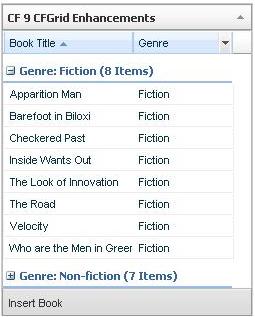
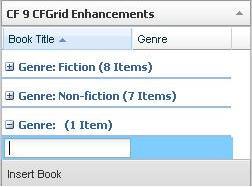
All these new attributes are available only for HTML type grids. In the above code I defined the collapsible as true and assigned a value for the title attribute. The insert and insert button attributes will take effect only when the select mode is true. On clicking the Insert Book button at the bottom of the grid, will introduce a new row at the end and user can add a new record.
Over here are the output of the code.