
Building KiloNorth - A Product Manager's Hacks for Shipping Code with AI Interns
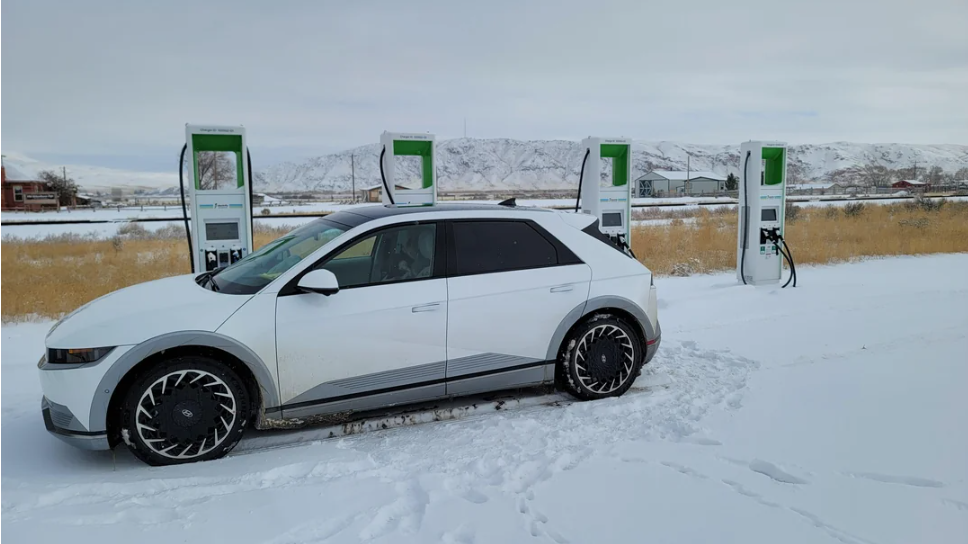
I shipped an EV charging app. Took about 6 weeks of nights and weekends. Not because I suddenly became a senior engineer—I’m still a product manager who writes user stories better than TypeScript. But I learned how to treat Claude Code and agents like very fast junior developers who need detailed specs and constant course correction.
Try it: kilonorth.netlify.app
The Problem (From Actual User Conversations)
I talked to four EV drivers who don’t have home chargers. I didn’t send surveys. I just sat with them and watched how they actually find a station.
What I saw:
- Everyone opened 1-2 apps before choosing a station
- Nobody trusted the “available” status.
- Pricing was always a mystery until arrival in most cases.
- Every app felt like it was designed in 2020 or before.
That became my north star.
The Spec (Before Any Code)
I wrote requirements like I would for an engineering team:
Core Job-to-Be-Done:
Help EV drivers find working chargers with transparent pricing, verified by real users at the location.
Non-Goals (Things I Will NOT Build):
- Social features (photos, check-ins, friends)
- Gamification (points, badges, leaderboards)
- Advertising (keep it clean)
- Freemium upsells (just make it free)
This “non-goals” list saved me at least 2 weeks of scope creep.
How I Actually Worked With AI (Not “Prompting”)
I don’t prompt. I write requirements like I’m briefing engineers.
Tool Setup (2026 Reality)
| Role | Tool | Why / Context |
|---|---|---|
| Primary | Claude Code (terminal-based agent) | Handles multi-file changes, runs tests, catches errors I’d miss. |
| Secondary | Cursor | Better for visual tweaking of components (UI polish). |
| Not using (much) | DeepSeek | Claude Code got good enough that I only ping DeepSeek when Claude hallucinates about API formats. |
Example: Building the Community Reports Feature
Step 1: I wrote the full spec in Notion
Feature: Location-Verified Community Reports

User Story:
As an EV driver, I want to report charger status when I'm
physically at the station, so other drivers get reliable info.

Acceptance Criteria:
1. User must be within 100m of station (GPS check)
2. Can report: Working, Broken, Occupied, Payment Issue
3. Report shows timestamp: "Reported 45 min ago"
4. "Verified Proximity" badge if location confirmed
5. Users can't spam (1 report per station per 2 hours)

Edge Cases:
- What if GPS is off? → Show error, require location
- What if user spoofs location? → Can't prevent, rely on volume
- What if station has 10 "broken" reports? → Show count + most recent

Technical Constraints:
- Store in Supabase (reports table)
- RLS policy: user can only see own email, not others
- Debounce submission (prevent double-tap)
- Must work offline (queue report, sync later)
Step 2: I gave this to Claude Code via terminal
claude-code --task "Implement community reports feature per spec in notion.md.
Include: reports table schema, RLS policies, React component, location verification,
offline queueing with retry. Write E2E test that simulates user at station."
Step 3: Claude Code created:
- Database migration (Supabase schema)
- React component (report modal)
- Location verification hook
- Offline queue with retry logic
- Playwright test simulating Toronto user
Took ~30 minutes. But it wasn’t done.
Step 4: I found issues in manual testing
❌ GPS check was too strict (failed indoors)
❌ Offline queue didn’t handle network recovery
❌ Error messages were cryptic
❌ Loading states were janky
Step 5: I went back to Claude Code with specifics
claude-code --task "Fix location check: allow 150m radius instead of 100m,
add better error messages, fix offline retry to check navigator.onLine,
add skeleton loading to report modal"
Took 3 more iterations to get it right.
The Real Workflow
It’s not “AI writes perfect code.” It’s:
- I write detailed requirements (30-60 min)
- Claude Code implements (20-40 min)
- I manually test (30 min)
- I find 3-5 issues
- I give Claude Code specific fixes (15 min)
- Repeat steps 3-5 until clean
Each feature takes 3-4 hours of my time across 2-3 days. Not “shipped in an afternoon.”
What I Had to Learn (The Hard Way)
| Mistake | What Happened & Why | The PM Lesson |
|---|---|---|
| 1: Trusting AI on Performance | The sidebar worked perfectly with 10 chargers in dev, but froze with 50+ in production. Claude was calculating distances on every render. I had to learn about useMemo and virtualization to tell the AI how to fix it. | AI doesn’t know your production data. You have to test with realistic volumes. |
| 2: Skipping Mobile Testing | The app looked beautiful on a laptop but buttons were cut off on a 2018 Android phone. Default AI CSS didn’t account for older screens. I fixed it, but also made the product decision to drop support for devices older than 6-7 years. | AI codes for modern devices. You have to think about the long tail (and explicitly define your support cut-off). |
| 3: Not Defining “Done” | I vaguely asked for “dark mode.” I got a toggle, but it didn’t persist between sessions, didn’t update map markers, and ignored system preferences. I had to go back 4 times to fix it. | “Add dark mode” is not a requirement. Explicitly define behavior (e.g., “Add dark mode that persists in localStorage, updates markers, and respects system settings”). |
The Release Process (Because PMs Love Process)
I built a quality gate that every PR must pass. Not because I enjoy bureaucracy, but because I shipped broken code twice and learned my lesson.
CI/CD Pipeline (GitHub Actions)
# Every PR triggers:
1. npm ci (clean install)
2. npm run build (catches TypeScript errors)
3. npm run test:e2e (Playwright tests)
4. Bundle size check (fails if >500KB)
5. Lighthouse CI (fails if performance <90)
If any step fails, PR is blocked. No “I’ll fix it later.” Also, ensured that build and my e2e is 100% on my local before shipping or committing.
Manual QA Checklist (I Print This Out)
Before I approve my own PR:
- [ ] Test on iPhone (Safari)
- [ ] Test on Android (Chrome)
- [ ] Test on slow 3G (DevTools throttle)
- [ ] Test with location denied
- [ ] Test with 0 nearby stations
- [ ] Test with 70+ stations
- [ ] Test offline → online transition
- [ ] Check accessibility (keyboard nav)
Takes ~20 minutes per feature. But I catch bugs before users do.
The “Approved” Label
Only I can add approved label. Even though I’m the only contributor. Why?
Because it forces me to consciously say “this is ready” instead of merging when I’m tired.
Small thing, but it works.
What I Shipped (Reality Check)
Week 1-2: Project setup, design system, basic map
Week 3: Markers, filtering, station details
Week 4: Community reports (took longer than planned)
Week 5: PWA support (harder than expected)
Week 6: Bug fixes, performance tuning, polish
That’s ~6 weeks of nights/weekends part-time, not “4 weeks full-time.”
Each release had:
- Written requirements doc
- Claude Code implementation
- Manual testing on 3 devices and browsers in laptop as the app supprots web version as well.
- CI/CD pipeline with Automated test coverage
- Deployment via Netlify
Real Challenges I Faced
| Challenge | The Problem | The Fix |
|---|---|---|
| 1: Messy Map Data | The charger database was full of missing prices, wrong locations (off by 500m), and duplicate names. | I spent a weekend defining strict data-cleaning rules—like merging duplicates within 50 meters and standardizing network names. Claude wrote the code, but I provided the logic. |
| 2: Flaky Location Tracking | Phone location permissions are unreliable. Sometimes they fail silently; sometimes they give a stale location. | I designed a 4-step fallback net: Try GPS ➔ Fall back to IP Address ➔ Default to last known city ➔ Show a clear error. Claude built it, but the flow came from my PM experience. |
| 3: Scope Creep (From Myself) | I got carried away and built cost tracking, trip history, and analytics. Then I checked the dashboard: I had exactly 4 users. | I deleted the extra features. I stripped the app back to just the core map and focused entirely on getting the basics perfect first. |
PM decision: Don’t add features for hypothetical users. Ship, learn, then iterate.
What’s Actually Next (Q3/Q4 2026)
| Status | Features |
|---|---|
| Committed | • iOS app (React Native, already started) • Android app (same codebase) • Better PWA install flow |
| Maybe | • Route planning (if 100+ active users request it) • Offline maps (if rural users confirm it’s needed) |
| Not Building | • Social features (goes against core principle) • Premium tier (keeping it free) • Ads (ruins the experience) |
What I Learned About AI + PM Work
| Lesson | Details & Examples |
|---|---|
1. AI Doesn’t Replace Product Thinking | Claude Code can write a feature, but it can’t tell you if it’s the right feature. Example: It suggested adding “Favorite Stations” bookmarking. Technically easy. But I asked: “Do people re-visit the same chargers?” Checked with users. Answer: No, they charge wherever is convenient. Saved 2 days of wasted work. |
2. Requirements Quality = Output Quality | Vague: “Add user profiles” 👉 Result: Claude builds what it thinks I mean (probably wrong). Specific: “Add user profile with: display name (editable), email (read-only), car model (dropdown with 50 common EVs), battery capacity (number input in kWh). No photos, no bio, no social connections.” 👉 Result: Claude builds exactly what I need. |
3. Testing is Still Your Job | AI can write tests, but it doesn’t know what your actual users will do, what devices they use, network conditions, or edge cases. My Manual QA: • Pixel 9 Pro (modern) • OnePlus 6 (old Android) • DevTools throttled to Slow 3G • With location denied • Airplane mode toggled mid-session That’s manual work. Can’t automate judgment. |
4. The PM Role Evolved, Didn’t Disappear | Less time: Grooming backlogs. More time: Writing detailed requirements, making product decisions (what NOT to build), testing edge cases, and validating with real users. Skills that still matter: • Understanding users deeply • Writing clear acceptance criteria • Knowing when “good enough” is good enough • Saying no to scope creep. |
Try It
If you’re a PM curious about building: Start. Your product skills (requirements, prioritization, quality gates) are more valuable than coding ability. The tools are ready. The question is: what will you build? Try: kilonorth.netlify.app
